Sunday, July 17, 2022

RPA on Cloud Computer

I’ve been playing around with Linux with dynabook N40 that my kids used to use. That in itself is also a hobby (:-), but I want to try RPA with a purpose. I think that many who think of RPA personally are for stock or investment purposes, but I don’t do such things at all, but I still regularly gather online information and so on. I have been playing with Sikulix on my dynabook N40, and now I try it on my Cloud Computer, so called ( only by me ) AWS Workspaces.
Sikulix is distributed in java, so there is no need to install it, and AWS Workspaces comes with java as standard, so all you have to do is download and run the jar file.

$ java -jar sikulixide-2.0.5.jar

The integrated editor was started without any problems. However, when I run a simple sample, I get an unfamiliar error.

Sikulix Error on AWS Workspaces

Hmmm, something about a glib version mismatch? I’m honestly not very good at this (lol), and AWS Workspaces is a somewhat complete package system, so I don’t feel like recompiling the glib system, and I think it should be used as it is. I am now investigating and considering other workarounds. AWS Workspaces , of course, are regularly updated with security measures and version upgrades. I wonder if it will work after a while without doing anything? I am just hoping it (:-o).

Labels: , , ,

Monday, July 11, 2022

Audacity on Cloud Computer

I have a hobby, apart from computers, of extracting sound from various Video objects and listening to it, but I have not heard of other people doing this (:-o), so it might be a minor hobby. However, it seems that our brains process images and sounds at the same time, but actually they are biased toward visual information (I just heard a brain scientist told this), so if you listen to even familiar images with only the sound extracted, you will feel sounds you never noticed before, and you will “see” a different world. (I hope, probably).
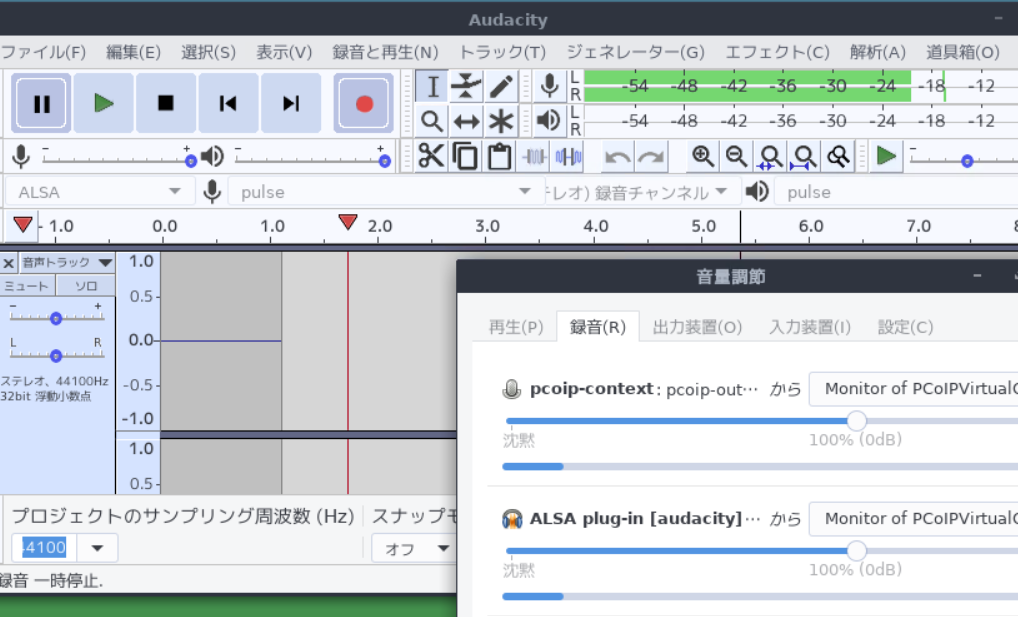
I am playing with AWS Workspaces, which I have named Cloud Personal Computer for personal cloud use, and I will try using Audacity there. Audacity is so wonderful audio editing application that can be used on both Linux and Windows, so it can easily be installed on AWS Workspaces . In addition, I’ll install pavucontrol, which works well with Audacity, and since it’s RedHat-based, it looks something like this

$ sudo yum install audacity pavucontrol

With Audacity running and recording started (or paused), simply start pavucontrol and change Audacity’s input in the Recording tab to fit your environment. Of course, for those who want to listen with higher accuracy and sound quality, this may be a little insufficient, but for my hobby level, it is so good. Since it picks up all the sounds of the computer, even operating system error sound are recorded, but since it is a Cloud Computer, it will continue to record even if the physical computer application is closed and left alone (:-).
Also, one of the biggest advantages of the Cloud Computer is that the Cloud Computer is physically located in a data center somewhere, and the network distance from the sound source you want to record is often closer than at home, so the quality is often better. Although the quality of home networks has improved recently, there are still times on weekends when I get what is called “Circling…” and have to pause while watching videos, but I have not yet experienced this with the Cloud Computer. I have the impression that the quality is quite good (of course, it depends on the situation and environment). However, as I wrote a bit about this before , this method can also be used to record various video and music services that are popular nowadays if you try to, so you need to pay attention carefully to the laws and copyrights of each country.
Audacity on Cloud Computer

Labels: , , ,

Friday, July 8, 2022

AWS Workpaces Desktop

I purchased AWS Workspaces as my home Cloud computer (although it is free for a while) and started using it. The OS I chose this time is called AWS Linux, but if you usually use Windows OS and choose Windows for Workspaces, you can use it as a normal computer without much discomfort. AWS Linux seems to be based on RedHat, and the desktop is GNOME2-based MATE. However, it seems to be almost complete, and for the original purpose of using Workspaces, it would be best to use it as it is.
The only major applications installed from the start are the open source LiberOffice and Firefox, but of course necessary applications can be easily added with yum. However, there seems to be some AWS etiquette in yum.
When I tried to play youtube on Firefox, the picture quality was very good rather tham my expectation, with just a little bit of choppiness if you don’t set it to full screen. And the sound played without any problems without any additional settings. This was a surprise to me, a Linux geek until about 10 years ago. I remember that back then, it was normal to not be able to play sound when connecting by VNC, and even if you forced playback of video, it was useless in terms of computer resource and network quality. The combination of the AWS Workspaces server and the client application must have been perfected.
However, this time I only confirmed that I could play Youtube and other videos on Cloud PC, and I will not use it because the FireTV connected to my TV is for everyday use, as it is still better quality in terms of picture and sound (:-).

Labels: , , ,

Wednesday, July 6, 2022

AWS Workspaces

I would like to purchase Cloud PC as my second computer because it is inconvenient to use only the Dynabook N40. I decided to try so called AWS Workspaces, which I found on Preliminary Research.
I went to the AWS website and registered as a member. First, I entered my personal information such as name, address, and credit card information, but I still feel a little uncomfortable entering my credit card information online. However, there is no fee for membership registration, so you don’t have to worry about it (I believe :-). If you think of it as the same as the recent video services such as Netfilix and U-NEXT that require credit card information just to watch a trial video, you may feel less resistance. Incidentally, I have also tried a whole major video subscriptions for free, but I am not using any of them now (:-o).
After completing the membership registration in the same manner as video services, the next step is to apply for the service. From this point on, you need to pay attention to the fees that may be incurred depending on the contents of your application. However, it is unlikely to be a large amount of money, so there is no need to worry more than necessary (I hope :-).
When searching for services, there are many that even I, as a system engineer, cannot even imagine, and when I try to read the explanation, I suddenly jump to an another language page, so I feel that the hurdle is still high for those who are not in the IT field. I wish AWS would try harder in this area (l:-o).
Still, I managed to find Workspaces, and selected CPU, memory, storage size, and OS. First of all, it is OK for me the minimum amount of Linux, but I found that 1 CPU, 2G memory, and 50G of user volume were “free” , so I chose this. I heard that it would be free for at least 3 months, but the original fee is $34 for a fixed monthly fee or $10 + $0.25 for an hourly fee, so it is a fairly high fee for a subscription. Also, it seems that the price and free slots vary a lot depending on the region (where the cloud computer is located) and the time of year.
I’d like to get a laptop with a good performance for about $1000 as a home computer, and I’d like to get it to arround $30 per month for a subscription, so it seems a bit out of my price range. Well, it’s the first time and it looks like it’s free, at least for a while, so I’ll have a little fun with it for a moment.

AWS Workspaces

Labels: ,